
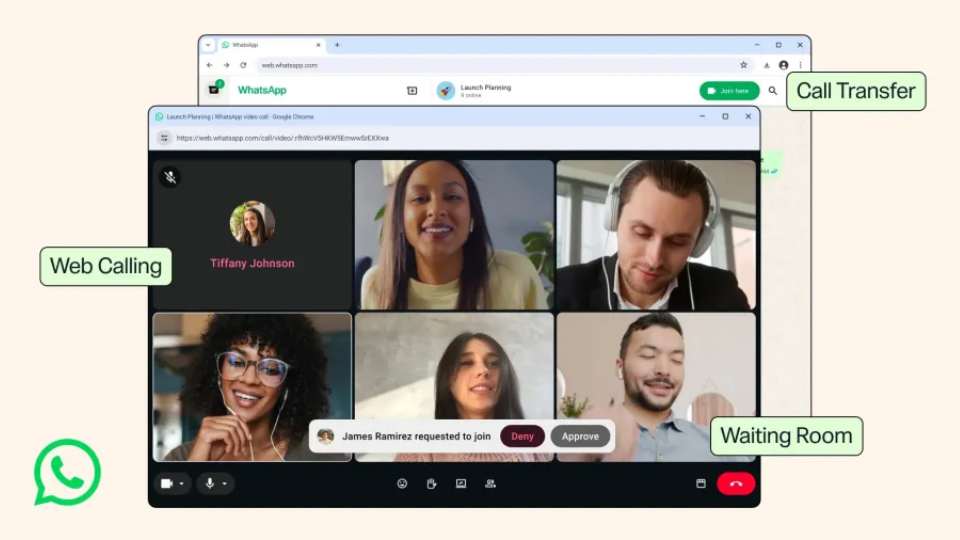
WhatsApp is rolling out voice and video calling directly inside its web browser application. For years, WhatsApp users had to install the official mobile app or download desktop software to jump on calls. Meta is finally closing that gap by bringing complete call support straight to WhatsApp Web.
The new web interface mirrors what you already see on mobile and desktop apps. A dedicated Calls tab stores your call history, contact lists, and favorite connections in one spot. Browser callers get full access to standard desktop features, including real-time screen sharing and live emoji reactions during video sessions.
Meta is also introducing seamless device switching for active calls. You can now transfer an ongoing call from your computer browser to your phone without dropping the connection or hanging up first. If you start a meeting at your desk on WhatsApp Web, you can hand off the signal to your mobile app and keep talking as you step away.
To make the app more friendly for remote work, Meta added virtual waiting rooms for group calls. When host account owners generate a public call link, they can toggle on a setting that requires approval to join. Meeting hosts can let guests into the main call when ready or kick unwanted participants out of the room instantly.
Audio and video quality are getting noticeable upgrades too. WhatsApp Web now includes automated background noise suppression, filtering out loud ambient sounds if you take calls in busy environments like cafes or crowded rooms. Video feeds will also stream in full high definition from the very first second of the call. Previous versions often took several seconds to buffer before upgrading to clear resolution.
These calling updates tie into WhatsApp broader push toward username-based accounts. Meta recently opened reservations for custom handles, allowing users to secure unique display names. Once the username system goes live across all platforms, users can place calls and send messages without sharing their personal phone numbers.
Adding full calling tools to the browser turns WhatsApp Web into a complete communication hub. Users no longer need to install extra software packages to host video meetings, share screens, or manage call queues. Bringing these features directly to standard browsers makes WhatsApp a stronger competitor against workplace platforms like Zoom and Google Meet.